Enquiry Widget
Installation
Create a widget instance by embedding the following code within your webpage inside the <body> element:
<div id="Bs-EnquiryWidget"></div>
<script
id="booking-suedtirol-js"
src="https://widget.bookingsuedtirol.com/v2/bundle.js"
defer
></script>
<script>
document
  .querySelector("#booking-suedtirol-js")
  .addEventListener("load", () => {
    BookingSüdtirol.Widgets.Enquiry("#Bs-EnquiryWidget", {
      id: undefined,
      propertyId: undefined,
      lang: "de",
      privacyURL: "/path/to/privacy/page",
      onEnquirySuccess: (reservation) => {
        // Called after successful enquiry
      },
    });
  });
</script>
Include the script element with src="https://widget.bookingsuedtirol.com/v2/bundle.js" from the code above exactly as specified. Do not self-host a copy of the script and do not include its code into a self-hosted JavaScript bundle file. If you do, the widget will not work correctly.
Configuration
Use BookingSüdtirol.Widgets.Enquiry(domElement, settings) to create new widget instances.
It returns a widget instance, see Widget instances.
Method arguments
domElement: string | DOM element
The CSS selector or DOM element where your widget will be mounted.
settings: object
Initialization options. See API below. Each widget instance can have its own settings.
URL parameters
The following list of settings can also be passed over the URL.
propertyIdlangarrivaldepartureofferIdroomIdboardIdutm_mediumutm_sourceutm_campaign
Notice that URL parameters always overwrite widget instance settings.
API
id: string
The widget ID
Mandatory field
propertyId: number
ID of the property/accommodation
Mandatory field. The property must already have been activated for the widget.
accommodationId
accommodationIdDeprecated. Use propertyId instead.
privacyURL: string
Defines the URL to the privacy policy page of the website where the widget is embedded. The language used on the page must match the lang field.
Examples:
/en/privacyhttps://example.com/en/privacy
Mandatory field
lang: string?
Language
de: German (default)it: Italianen: Englishfr: French
arrival: string?
Defines the arrival date in ISO 8601 format (yyyy-MM-dd)
2020-02-20
departure: string?
Defines the departure date in ISO 8601 format (yyyy-MM-dd)
2020-02-23
layout: string?
Determines the widget layout
layout_1(default)layout_2layout_3
offerId: number?
Enables you to preselect a specific special via its ID.
Loading specials …
roomId: number?
Enables you to preselect a specific room via its ID. The ID can be read either via the MSS interface or the following chart.
Loading rooms …
boardId: number?
Enables you to preselect a specific board via its ID.
Loading property info …
promotion: [string | null, string | null, string | null]?
Enables you to customize the advertising fields medium (ResID_SourceContext), source (ResID_Source) and campaign (ResID_Value) and submit them to the PMS.
How exactly the fields are to be filled has been precisely defined in the AlpineBits Standard and can be read in the corresponding documentation in section 4.2.5 Implementation tips and best practice.
["Advertising medium", "Advertising source", "Advertising campaign"];
Default value: [null, null, null]
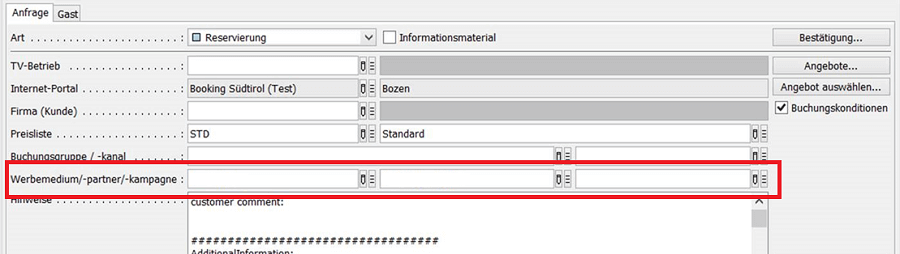
The Google Analytics parameters utm_medium, utm_source, and utm_campaign offer the possibility to submit the fields individually.
For example, the URL https://www.example.com/?utm_medium=metasearch&utm_source=tripadvisor.com&utm_campaign=tripadvisor_desktop would submit ['metasearch', 'tripadvisor.com', 'tripadvisor_desktop'] to the PMS.
Using this feature will set a 30-day tracking cookie. In this case, add the cookie bs_widget_promotion to your Privacy Policy. If you want to prevent the cookie from being set, insert the code window.BookingSüdtirolTrackingConsent = false; before the widget is loaded.
source: string?
Enables the widget to be installed on portals with multiple properties. For this functionality, please contact support directly.
onEnquirySuccess: (reservation: object)? => void?
Function called after successful enquiry.
{
    arrival: string | undefined;  // ISO 8601
    departure: string | undefined;  // ISO 8601
    occupancies: {
        roomId: number;
        roomTitle: string;
        adults: number;
        children: number[];
        board: 0 | 1 | 2 | 3 | 4 | 5 | 6;
    }[];
    gender: "" | "m" | "f" ;
    firstname: string;
    lastname: string;
    email: string;
    phone: string;
    street: string;
    zipcode: string;
    city: string;
    country: string;
    note: string;
    newsletter: boolean;
}
Widget instances
The snippet under Installation creates a widget and leaves it in place. Keep the return value instead to control the widget yourself, for example in single page applications or on pages with several widgets.
The script element from Installation is still required. BookingSüdtirol only exists once it has loaded.
Creating a widget returns a widget instance:
interface WidgetInstance {
  render: () => void;
  unmount: () => boolean;
}
render()
Mounts the widget into its DOM element. Called automatically when the instance is created. Call it yourself to mount the widget again after unmount().
unmount()
Removes the widget from its DOM element. Returns true if a mounted widget was removed, false if there was nothing to remove. Call it before the container element is removed from the page, for example when a single page application navigates away.
Multiple instances
You can create any number of widget instances on a page. Every instance is independent and needs its own container element and settings.
const widgetA = BookingSüdtirol.Widgets.Enquiry("#Bs-EnquiryWidget-A", settingsA);
const widgetB = BookingSüdtirol.Widgets.Enquiry("#Bs-EnquiryWidget-B", settingsB);

// Later, before the containers are removed from the page
widgetA.unmount();
widgetB.unmount();
If domElement is a CSS selector that matches more than one element, the widget is mounted into the first match only. Give every container a unique selector.
Events
As the user interacts with the widget, events are generated in the background for the following interactions:
Google Analytics 4
generate_lead
The user completes an enquiry.
| Parameter | Description | Value |
|---|---|---|
| transaction_id | Unique reservation ID | 1234567 |
| affiliation | Widget type | HGV Enquiry Widget |